

AI Skills Cookbook
Intermediate
8 min read
Setting Up Your AI Workspace
Discover how to build a reliable AI development workspace using Python, virtual environments, Jupyter, package management, and reproducible project practices that scale from experimentation to real-world machine learning.
Introduction
Writing Python code is easy. Building a Python environment that remains reliable after six months, works on another computer, supports multiple machine learning projects, and can be reproduced by a collaborator is considerably harder.
This distinction becomes important in Artificial Intelligence. A modern AI project rarely consists of Python alone. It may depend on NumPy for numerical computation, Pandas for data manipulation, PyTorch for deep learning, Jupyter for experimentation, visualization libraries for analysis, and specialized packages for accessing models or processing datasets. Each dependency has its own version, and some depend on compiled libraries, GPU runtimes, operating-system components, or other Python packages.
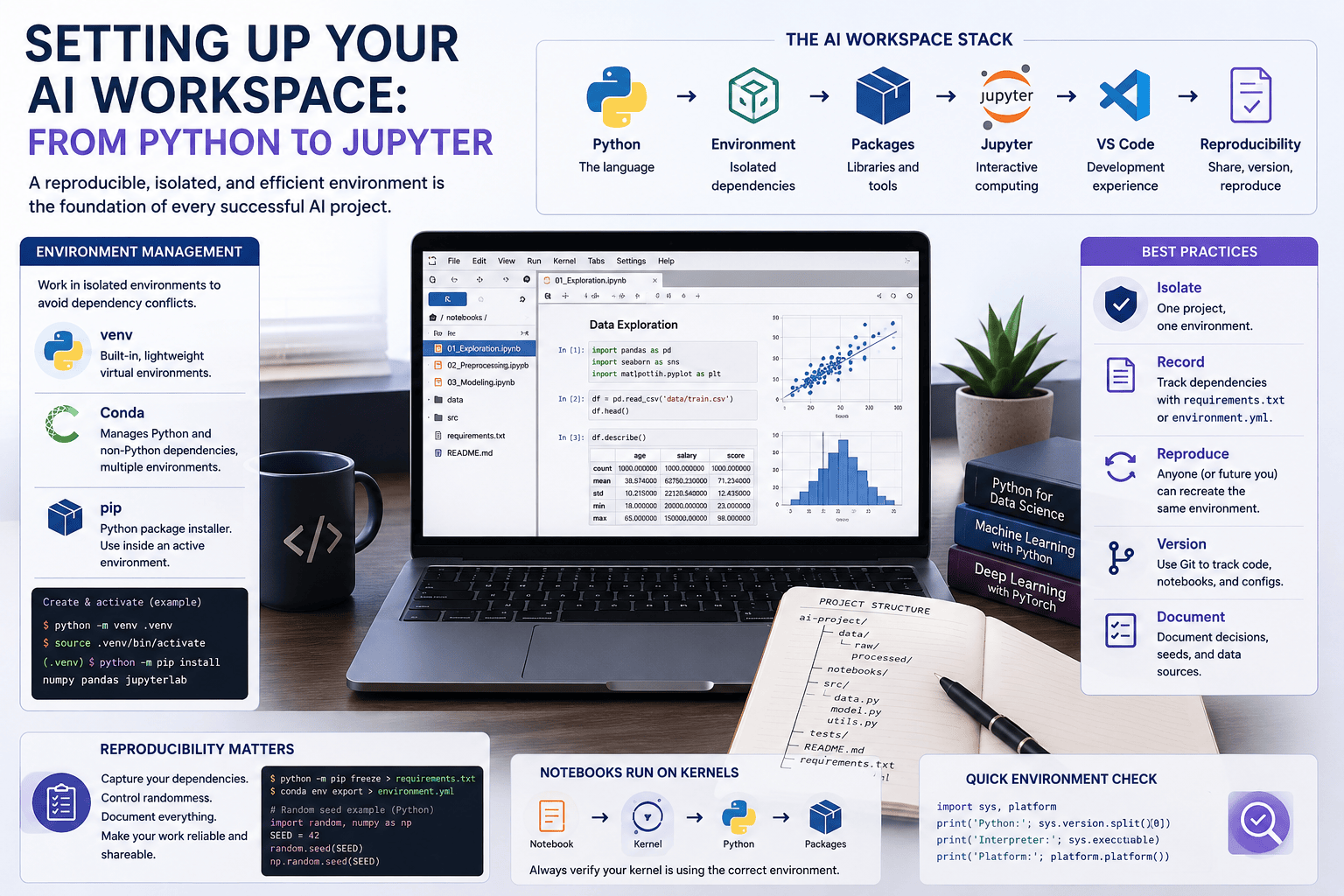
An effective AI workspace therefore has several layers. The Python interpreter executes code; a virtual environment isolates dependencies; a package manager installs them; an editor such as Visual Studio Code provides the development interface; and Jupyter provides an interactive computational environment for experimentation and analysis. Tools such as Anaconda or Miniconda can manage several of these layers together.
For experienced learners, the important skill is no longer simply knowing how to install these tools. It is understanding how they interact and how to design an environment that is isolated, reproducible, inspectable, and appropriate for the project being developed.
Python as the Computational Foundation
Python dominates contemporary data science and AI not because the language itself performs every computation efficiently, but because it provides a convenient interface to a large scientific computing ecosystem. Libraries such as NumPy, PyTorch, and many machine learning frameworks execute computationally intensive operations in optimized native code while exposing comparatively simple Python interfaces.
This distinction matters. When you write a tensor operation in Python, Python may orchestrate the operation while the actual computation occurs in optimized C, C++, CUDA, or another lower-level runtime. Python therefore functions partly as a coordination layer through which sophisticated numerical systems can be assembled.
A useful first diagnostic in any environment is to establish exactly which Python interpreter is executing the code:
import sys
import platform

print("Python:", sys.version)
print("Interpreter:", sys.executable)
print("Platform:", platform.platform())
The value of sys.executable is particularly important. Many mysterious notebook and package errors ultimately result from code running under a different interpreter from the one the developer thought they were using.
Environments: Isolation Before Installation
Suppose one project depends on version 1.x of a library while another requires version 2.x. Installing everything into a single global Python environment creates an obvious conflict. Even when projects initially use compatible versions, upgrading a dependency for one experiment can unexpectedly break another.
Virtual environments solve this problem by giving projects isolated Python installations and dependency sets. Python's built-in venv module provides a lightweight solution:
python -m venv .venvOn Windows, the environment can typically be activated with:
.venv\Scripts\activateOn macOS and Linux:
source .venv/bin/activateOnce activated, package installation occurs within that environment rather than globally:
python -m pip install numpy pandas matplotlib jupyterlabUsing python -m pip rather than simply pip is a useful defensive practice because it explicitly associates pip with the currently selected Python interpreter.
For many AI projects, this degree of isolation is sufficient. More complex scientific environments may benefit from Conda, particularly when dependencies extend beyond ordinary Python packages into compiled libraries or system-level components.
The underlying principle, however, remains the same:
One project, one controlled environment.
Conda, Anaconda, Miniconda, and pip
These tools are sometimes treated as interchangeable, but they solve somewhat different problems.
pip is fundamentally a Python package installer. venv provides environment isolation. Conda combines environment management with a broader package-management system capable of handling Python itself and non-Python dependencies. Anaconda bundles Conda with a large collection of scientific packages and graphical tools, whereas Miniconda provides a smaller base installation from which environments can be constructed selectively.
For advanced users, Miniconda or another minimal Conda distribution is often preferable to installing an enormous preconfigured environment. It encourages explicit dependency management and avoids populating projects with packages they never use.
A dedicated environment might look like:
conda create -n lb-ai python=3.12
conda activate lb-ai
Packages can then be installed deliberately:
conda install numpy pandas jupyterlabWhen pip packages are also required, they can generally be installed after activating the Conda environment:
python -m pip install some-packageThe important point is not to develop a rigid belief that either Conda or pip is universally superior. The appropriate choice depends on the dependency structure of the project. What matters is that the environment is controlled and its construction can be reproduced.
Dependency Management and Reproducibility
A working environment is useful. A reproducible environment is much more valuable.
Suppose an experiment produces excellent results today. Six months later, a library update changes preprocessing behavior or modifies a model API. If the original environment cannot be reconstructed, reproducing the experiment may become difficult or impossible.
For a pip-based project, dependencies can be captured with:
python -m pip freeze > requirements.txtand recreated using:
python -m pip install -r requirements.txtConda environments can similarly be exported:
conda env export > environment.ymlThis is useful, but experienced practitioners should distinguish between recording an environment and designing dependency specifications. A raw pip freeze may capture every transitive dependency and platform-specific package in the current environment. That can be valuable for archival reproduction, but a carefully maintained project dependency file may be better for ongoing development.
Modern Python projects increasingly define dependencies through pyproject.toml, allowing project metadata and dependency requirements to live in a standardized configuration. The larger principle is more important than the particular file format: dependencies are part of the project and should be treated as code, not as undocumented properties of a developer's computer.
Jupyter Is a Computational Environment, Not Just a Notebook
Jupyter fundamentally changed scientific computing by combining executable code, narrative explanation, mathematical notation, visualization, and outputs within a single document.
For AI experimentation, this is extremely powerful. A researcher can load a dataset, inspect distributions, transform features, train a model, visualize results, and explain methodological choices within the same computational narrative.
A notebook might begin with:
import numpy as np
import pandas as pd
import matplotlib.pyplot as plt

rng = np.random.default_rng(42)

data = pd.DataFrame({
    "study_hours": rng.normal(5, 1.5, 200),
    "assessment_score": rng.normal(70, 10, 200)
})

data.describe()
The ability to execute individual cells encourages experimentation, but it also introduces one of Jupyter's most important weaknesses: execution order can differ from document order.
A notebook may display cells as:
[1] Import libraries
[7] Transform data
[3] Define function
[9] Train model
and still appear to work because variables remain in the kernel's memory. Restarting the kernel and running the notebook from top to bottom may reveal that the supposedly reproducible analysis actually depends on hidden state created during an earlier interactive session.
Kernels: The Connection Between Jupyter and Python
One of the most important concepts for advanced Jupyter use is the kernel.
The browser interface does not itself execute Python. Instead, Jupyter communicates with a kernel running a particular interpreter. This separation explains why a package may be available in a terminal yet unavailable inside a notebook: the terminal and notebook may be using different environments.
Within a notebook, verify the interpreter directly:
import sys
print(sys.executable)
For a dedicated environment, an explicit kernel can be registered:
python -m pip install ipykernel

python -m ipykernel install \
  --user \
  --name lb-ai \
  --display-name "Python (LB AI)"
The notebook can then explicitly select Python (LB AI).
This creates an important conceptual chain:
Notebook
   ↓
Jupyter Kernel
   ↓
Python Interpreter
   ↓
Installed Packages
   ↓
Native CPU / GPU Libraries
Understanding this chain resolves a surprisingly large proportion of environment-related problems.
VS Code and the Notebook-to-Software Transition
Jupyter is excellent for exploration, but mature AI projects rarely remain entirely inside notebooks.
As experimentation stabilizes, reusable functionality should usually migrate into Python modules. Data-loading functions, preprocessing pipelines, model definitions, evaluation utilities, and configuration logic become easier to test, version, reuse, and maintain when separated from the notebook interface.
A project might gradually evolve into:
ai-project/
│
├── data/
│   ├── raw/
│   └── processed/
│
├── notebooks/
│   └── exploration.ipynb
│
├── src/
│   ├── data.py
│   ├── features.py
│   ├── model.py
│   └── evaluation.py
│
├── tests/
│
├── .gitignore
├── README.md
├── requirements.txt
└── pyproject.toml
Visual Studio Code is particularly useful at this stage because notebooks and conventional Python modules can coexist within the same development environment. The notebook remains an interface for exploration and communication, while the src directory becomes the home of reusable software.
This distinction is important in professional AI engineering:
Notebooks are excellent laboratories. They are rarely the entire factory.
Reproducibility Goes Beyond Package Versions
Dependency management is only one dimension of reproducibility. Machine learning introduces additional sources of variability, including random initialization, stochastic optimization, shuffled datasets, nondeterministic GPU operations, and changing external data.
Setting a random seed can improve reproducibility:
import random
import numpy as np

SEED = 42

random.seed(SEED)
np.random.seed(SEED)
Frameworks such as PyTorch have their own random number generators and determinism settings. Even then, exact numerical reproducibility may vary across hardware, library versions, and accelerator implementations.
A serious AI workspace should therefore record more than code. Depending on the project, reproducibility may require documenting dataset versions, random seeds, preprocessing decisions, model configurations, package versions, hardware assumptions, and experiment metadata.
seed = 42 to a notebook. It is a property of the entire computational workflow—from data and dependencies to code, configuration, hardware, and execution order.
CPU, GPU, and the Environment Beneath Python
Traditional data analysis can often be performed entirely on CPUs. Deep learning changes the computational requirements because training neural networks involves enormous numbers of parallel matrix and tensor operations.
Graphics Processing Units (GPUs) are particularly effective at these workloads. Frameworks such as PyTorch allow Python code to dispatch tensor operations to GPU accelerators while hiding much of the lower-level complexity.
However, this introduces another layer to environment management. GPU-enabled workflows may depend on compatible combinations of hardware drivers, framework builds, accelerator runtimes, and operating-system libraries. A Python package can therefore be installed successfully while GPU acceleration remains unavailable because the problem exists beneath the Python layer.
This is why advanced practitioners learn to diagnose environments systematically rather than repeatedly reinstalling packages. Determine the interpreter, inspect package versions, verify the framework, check accelerator availability, and only then investigate the lower-level runtime.
A Minimal Environment Diagnostic
A small diagnostic cell at the beginning of an AI project can be surprisingly valuable:
import sys
import platform
import numpy as np
import pandas as pd

print(f"Python:     {sys.version.split()[0]}")
print(f"Executable: {sys.executable}")
print(f"Platform:   {platform.platform()}")
print(f"NumPy:      {np.__version__}")
print(f"Pandas:     {pd.__version__}")
For a PyTorch project, it can be extended:
import torch

print(f"PyTorch:    {torch.__version__}")
print(f"CUDA:       {torch.cuda.is_available()}")

if torch.cuda.is_available():
    print(f"GPU:        {torch.cuda.get_device_name(0)}")
These few lines establish a basic provenance record for the computational environment and provide useful information when an experiment behaves differently elsewhere.
From Workspace to Workflow
A professional AI workspace should ultimately make experimentation easier rather than become an administrative burden. The purpose of environments, dependency files, kernels, project structures, and version control is not organizational neatness for its own sake. They reduce uncertainty.
A robust workflow might begin by creating an isolated environment and recording its dependencies. Jupyter can then be used for exploratory analysis, while reusable functions gradually migrate into Python modules. Data and model configurations are recorded explicitly, random processes are controlled where appropriate, and the project is versioned so that both code and experimental decisions remain traceable.
At that point, the workspace stops being merely a place where Python happens to run.
It becomes research infrastructure.
Conclusion
Setting up an AI workspace is fundamentally an exercise in managing complexity. Python provides the computational interface, environments isolate dependencies, package managers construct the software stack, Jupyter enables interactive experimentation, and development tools such as Visual Studio Code support the transition from exploratory analysis to maintainable software.
For advanced practitioners, however, the most important concept is reproducibility. An experiment has limited scientific or engineering value if its computational environment cannot be understood, reconstructed, and tested independently. Interpreter paths, dependency versions, kernels, random states, data provenance, and hardware assumptions therefore become part of the experiment itself.
A carefully designed workspace creates the foundation on which everything else in AI development depends.
In the next AI Skills Cookbook guide, Working with Data: NumPy, Pandas & Visualization, we will use this environment to move from infrastructure to actual computation—examining how numerical arrays, tabular structures, vectorized operations, data transformation, and visualization work together to turn raw datasets into information that machine learning systems can use.
Key Takeaways
- An AI workspace is a computational system, not merely an installation of Python and Jupyter.
- Virtual environments isolate dependencies and prevent unrelated projects from interfering with one another.
venv,pip, and Conda solve related but distinct environment and package-management problems.- Jupyter notebooks execute code through kernels, which may use a different Python interpreter from the terminal or editor.
- Checking
sys.executableis one of the simplest ways to diagnose interpreter and package mismatches. - Notebooks are ideal for experimentation, but reusable AI code should increasingly migrate into structured Python modules.
- Reproducibility includes dependencies, execution order, data versions, random states, configuration, and sometimes hardware—not merely source code.
- GPU-enabled AI introduces additional infrastructure beneath Python that must be considered when diagnosing environments.
- A well-designed workspace provides the reproducible foundation required for reliable data science, machine learning, and Generative AI development.