

Generative AI
Intermediate
10 min read
Copilot
See how Copilot integrates AI into productivity tools and software development to enhance everyday work.
Introduction
As Large Language Models matured, the focus of Artificial Intelligence began to shift from simply answering questions to actively assisting users while they worked. Instead of opening a separate chatbot to ask for help, people increasingly wanted AI to become part of the applications they already used every day. This marked the beginning of a new generation of AI systems known as AI copilots—intelligent assistants designed to collaborate with users as they write documents, analyze data, develop software, attend meetings, and manage workflows.
One of the most influential examples of this approach is Microsoft Copilot.
Rather than existing as a single application, Copilot is a family of AI-powered assistants integrated across Microsoft's ecosystem, including Microsoft 365, Windows, GitHub, Azure, Dynamics 365, and numerous enterprise services. Built using advanced Large Language Models—including OpenAI's GPT models alongside Microsoft's own AI infrastructure—Copilot demonstrates how conversational AI can evolve into a practical workplace assistant.
Unlike ChatGPT, which introduced conversational AI to millions of users, or Claude, which emphasized reasoning and AI alignment, or Gemini, which pioneered native multimodal capabilities within Google's ecosystem, Copilot focuses on embedding AI directly into professional workflows. Its objective is not merely to answer questions, but to help users complete real tasks more efficiently.
Today, Copilot assists professionals across business, education, healthcare, finance, engineering, and software development. From drafting reports and analyzing spreadsheets to writing code and summarizing meetings, it has become one of the most widely deployed examples of enterprise AI.
AI for Productivity and Software Development
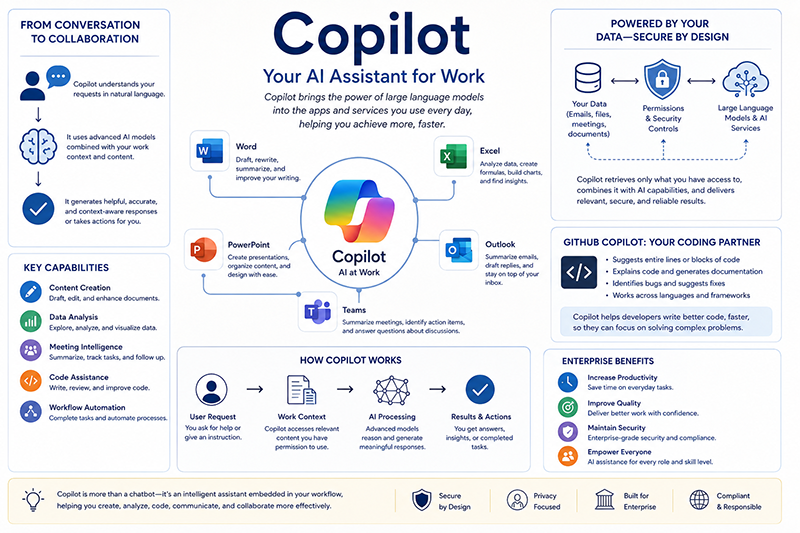
One of Copilot's defining characteristics is its deep integration into productivity software. Rather than requiring users to copy information into a chatbot, Copilot operates directly within familiar applications, allowing AI assistance to become a natural part of everyday work.
Within Microsoft Word, Copilot can generate first drafts, rewrite paragraphs, summarize lengthy documents, suggest improvements, and adjust writing styles for different audiences. Instead of starting with a blank page, users often begin with AI-generated content that they refine using their own expertise.
In Excel, Copilot assists users in analyzing datasets, generating formulas, identifying trends, creating charts, and explaining statistical relationships. Many users who are unfamiliar with advanced spreadsheet functions can now perform complex analyses simply by describing what they want in natural language.
Within PowerPoint, Copilot can transform written reports into presentation slides, generate speaker notes, reorganize content, and recommend visual layouts. Similarly, in Outlook, it summarizes long email conversations, drafts responses, and highlights important action items.
One particularly valuable capability is its integration with Microsoft Teams. During meetings, Copilot can generate summaries, identify decisions that were made, list assigned tasks, and answer questions about earlier parts of the discussion. This reduces the administrative burden of documenting meetings while helping participants focus on collaboration.
For software developers, GitHub Copilot has become one of the most influential AI coding assistants ever developed. By analyzing the surrounding source code, comments, and project context, GitHub Copilot suggests functions, completes code, explains unfamiliar algorithms, identifies potential bugs, and assists with debugging.
Unlike traditional code autocomplete, GitHub Copilot generates entire functions or classes based on natural language instructions or partially written code. Developers remain responsible for reviewing and testing the generated code, but the assistant often accelerates routine programming tasks and reduces repetitive work.
Behind these capabilities lies a combination of Large Language Models, retrieval systems, enterprise knowledge bases, and secure cloud infrastructure. Rather than relying solely on information learned during pre-training, Copilot frequently combines language generation with organization-specific documents, emails, calendars, and databases—subject to the user's permissions.
This approach illustrates an important concept known as Retrieval-Augmented Generation (RAG).
Instead of expecting the language model to remember every piece of information, RAG retrieves relevant documents from external knowledge sources and provides them to the model before it generates a response. This allows Copilot to produce answers that are grounded in current organizational data rather than relying only on its internal training.
Enterprise AI and Intelligent Workflows
Microsoft designed Copilot primarily for enterprise environments, where productivity, security, and collaboration are often as important as raw language generation.
Unlike public conversational AI systems, enterprise AI must operate within complex organizational environments that contain confidential documents, customer records, financial reports, software repositories, and internal communications. Protecting this information requires strong authentication, access control, encryption, and compliance with industry regulations.
Copilot addresses these challenges by respecting existing Microsoft security and permission systems. Users generally receive AI-generated responses only from information they are already authorized to access. This makes enterprise AI more suitable for organizations that manage sensitive information.
Another important development is the emergence of AI agents.
Traditional chatbots respond to individual prompts one conversation at a time. AI agents extend this idea by performing multi-step tasks independently. An agent may retrieve documents, analyze data, generate reports, send emails, schedule meetings, and interact with external applications while pursuing a broader objective specified by the user.
Microsoft has increasingly incorporated agent-based capabilities into the Copilot ecosystem, allowing organizations to automate complex business processes that previously required significant manual effort.
These developments illustrate an important shift in Artificial Intelligence.
Earlier AI systems primarily generated information. Modern AI assistants increasingly take action. This transition—from answering questions to assisting with complete workflows—is one of the defining characteristics of today's enterprise AI landscape.
However, these capabilities also introduce important challenges.
Like ChatGPT, Claude, and Gemini, Copilot can occasionally produce inaccurate information, misunderstand user intentions, or generate incorrect code. AI-generated software may compile successfully while still containing logical errors, security vulnerabilities, or inefficient implementations.
For this reason, organizations emphasize human-in-the-loop workflows, where AI accelerates work but important decisions remain under human supervision.
As AI becomes increasingly embedded within workplace software, the distinction between applications and AI assistants may gradually disappear. Future productivity tools are likely to include intelligent assistance as a standard feature rather than an optional add-on.
The final article in this category explores DeepSeek, whose efficient open-weight models have attracted significant attention by demonstrating that high-performance AI systems can be developed using innovative architectures and more accessible approaches to model deployment.
Conclusion
Microsoft Copilot represents an important stage in the evolution of Artificial Intelligence by demonstrating how Large Language Models can move beyond conversational interfaces and become integrated collaborators within professional environments. By embedding AI across productivity software, development platforms, and enterprise services, Copilot enables organizations to incorporate AI directly into everyday workflows rather than treating it as a separate technology.
Building upon ideas introduced by ChatGPT, Claude, and Gemini, Copilot highlights the growing importance of enterprise integration, Retrieval-Augmented Generation, AI agents, and secure organizational knowledge systems. These developments suggest that the future of AI lies not only in generating language, but also in helping people complete increasingly sophisticated tasks through seamless human-AI collaboration.
In the final article of this category, we will examine DeepSeek, an AI system that has gained international attention for its efficient open-weight models, innovative reasoning capabilities, and significant contributions to the rapidly expanding open AI ecosystem.
Key Takeaways
- Microsoft Copilot is a family of AI assistants integrated across Microsoft 365, Windows, GitHub, Azure, and other enterprise services.
- Copilot emphasizes AI-assisted productivity, helping users create documents, analyze data, summarize meetings, develop software, and automate workflows.
- GitHub Copilot has become one of the world's most widely used AI coding assistants.
- Retrieval-Augmented Generation (RAG) enables Copilot to generate responses grounded in current organizational knowledge rather than relying only on model training.
- Enterprise versions of Copilot prioritize security, permissions, compliance, and responsible handling of organizational information.
- Emerging AI agents allow Copilot to perform increasingly complex multi-step workflows while keeping humans involved in critical decision-making.
- Copilot illustrates how AI is evolving from a conversational assistant into an intelligent workplace collaborator, setting the stage for the final article on DeepSeek, which explores the growing importance of efficient open-weight AI models.